Paytm Business 29 Dec 2025
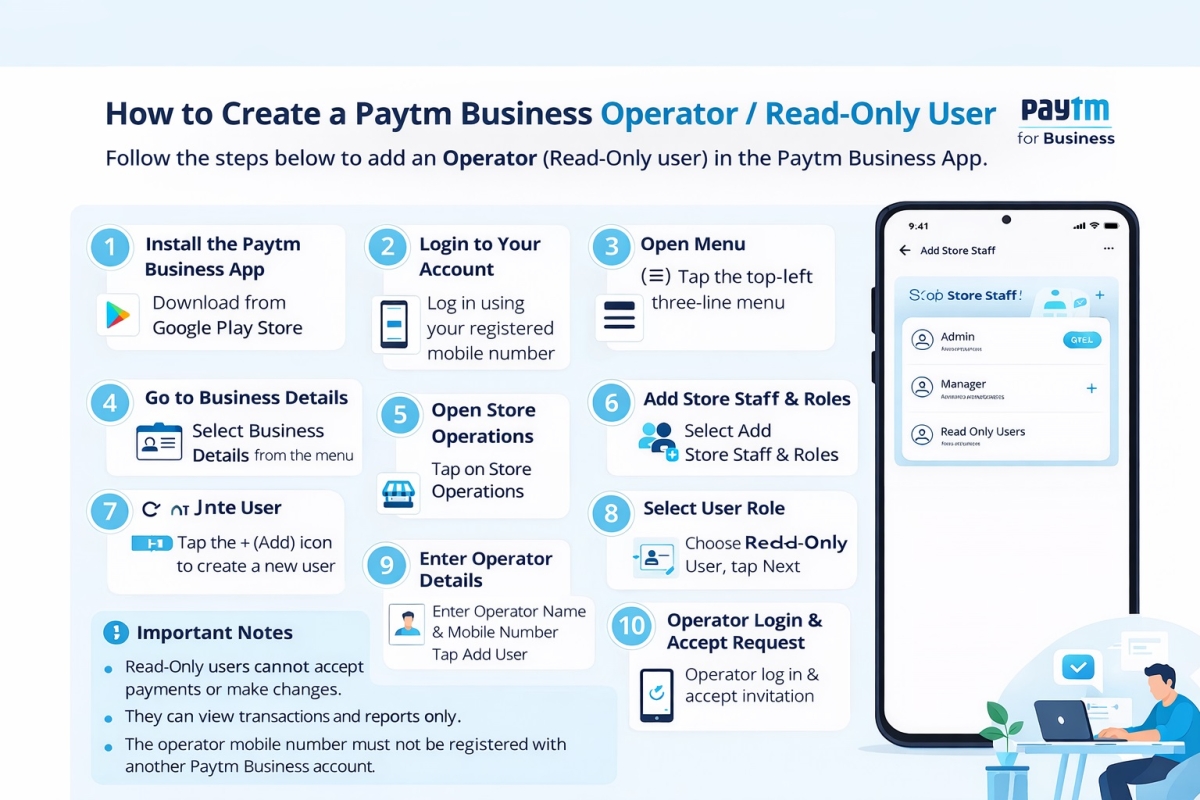
How to Create a Paytm Business Operator or Read Only User
Step-by-Step Guide
-
Install the Paytm Business App
Download and install Paytm for Business from the Google Play Store. -
Login to Your Account
Open the app and log in using your registered mobile number. -
Open Menu
Tap the three-line (☰) menu icon in the top-left corner. -
Go to Business Details
Select Business Details from the menu. -
Open Store Operations
Tap on Store Operations. -
Add Store Staff & Roles
Select Add Store Staff & Roles. -
Add New User
Tap the “+” (Add) icon to create a new user. -
Select User Role
Choose Read-Only User (Operator role) and tap Next. -
Enter Operator Details
-
Enter Operator Name
-
Enter Mobile Number
-
Tap Add User
-
-
Operator Login & Accept Request
The operator must log in using their mobile number and accept the invitation to activate the role.
-
Categories
- Paytm Business 2
- Phonepe Business 2
- BharatPe Business 2
- SmartupiQR 2
- FreeCharge Business 1
Popular Posts
Step by step guide to create a Staff account in the BharatPe…
30 Dec 2025 126
Why SmartupiQR Is the Best Dynamic QR Code API for Instant Bank…
31 Dec 2025 112
How to Create a Paytm Business Operator or Read Only User
29 Dec 2025 102